
Top 5 AI Video Generators for Solo Filmmakers and Small Production Teams in 2026
Making an independent film has always required difficult tradeoffs. A small studio may have a strong script and clear visual direction but lack the crew, equipment, locations, and post-production budget needed to put every idea on screen.
However, filmmaking demands more than generating one attractive clip. Characters must remain recognizable, camera movement needs a purpose, and separate shots must feel like they belong in the same world.
I compared ten leading AI video generators to find out which ones offer the most practical value for solo filmmakers and small production teams in 2026.
What Small Film Studios Need From an AI Video Generator
A one-person film studio cannot spend hours regenerating every shot or fixing major continuity problems in post-production. Each tool needs to reduce production pressure rather than create another technical obstacle.
These are the areas I consider most important:
● Cinematic image quality
● Character and costume consistency
● Camera movement control
● Multi-shot storytelling
● Reference image and video support
● Natural acting and physical motion
● Scene continuity
● Editing and extension tools
● Audio generation
● Cost per usable shot
No model performs equally well in all of these areas. Some produce beautiful single shots but struggle to continue a story. Others offer stronger direction and reference controls but need more preparation before generation.
For a small studio, the most useful setup is often a combination of tools rather than one model for the entire film.
Top 5 AI Video Generators for Solo Filmmakers
Loova for an Integrated AI Film Production Process
Loova is a strong starting point for filmmakers who want to develop more of a project inside one creative environment.
Instead of providing access to only one generation model, the platform brings together models including Seedance, Kling, Veo, Sora, PixVerse, Wan, Vidu, Grok Imagine, and others. It supports text to video, image to video, reference to video, video editing, and image generation, allowing filmmakers to choose different models for different shots.
That flexibility matters during film production. A realistic dialogue scene, stylized dream sequence, action shot, and environmental establishing shot may each require a different generation approach.
A solo filmmaker could use Loova Creative Studio to:
● Develop concept images for characters and locations
● Turn approved frames into moving shots
● Compare several video models for the same scene
● Use reference images to maintain costumes and visual style
● Refine or extend generated footage
● Organize story ideas with the AI Agent and Infinite Canvas
Loova’s reference to video tools also allow multiple character or subject images to guide generation, which is useful when a story depends on recurring faces, clothing, or objects. Its AI Agent provides an agentic canvas for creators where filmmakers can place scripts, character designs, location references, storyboards, generated shots, and revision notes in one expandable visual space. Text, image, and video nodes can be connected, allowing an approved character or keyframe to guide later scene generations instead of treating every clip as an isolated result.
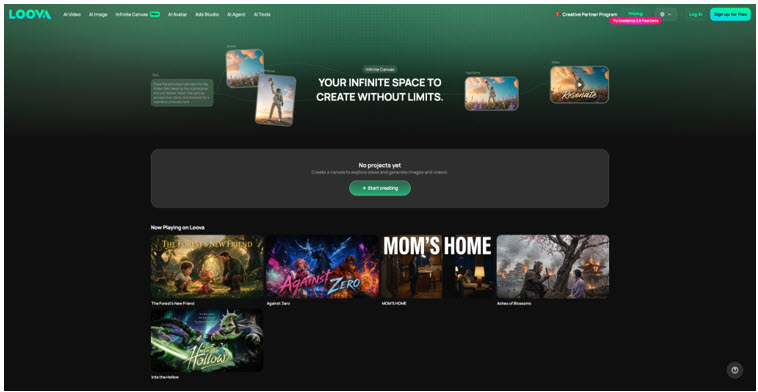
Filmmakers can also group assets by scene, compare alternate versions beside the same source, and keep approved shots separate from early experiments. This makes it easier to understand how the complete film develops from the initial concept.
The main limitation is that multi-model access adds another creative decision. Filmmakers need to learn which model is better for realism, controlled action, reference consistency, or stylized visuals.
Once that learning stage is complete, however, the ability to move between models can be more useful than relying on one generator for an entire film.
Runway for Cinematic Direction and Shot Control
Runway remains one of the most complete platforms for filmmakers who want detailed control over the appearance and movement of a shot.
Its Gen-4.5 model focuses on visual fidelity, prompt adherence, temporal consistency, physical accuracy, and controllable action. Runway also supports several generation modes, including image to video, keyframes, and video to video.
What makes Runway valuable for small studios is the way it responds to cinematic language. Prompts can define the shot size, camera path, lighting, atmosphere, action, and visual style rather than describing only the subject.
It is especially useful for:
● Controlled single-take scenes
● Cinematic camera movement
● Music videos
● Atmospheric short films
● Stylized transitions
● Live-action and AI hybrid projects
A filmmaker could generate a wide establishing shot, create a closer variation with the same visual direction, and use video editing tools to bring the result closer to the intended sequence.
Runway is not perfect. Its own documentation notes that objects can still disappear after being hidden, and cause-and-effect actions may sometimes happen in the wrong order. These issues become important when a scene depends on precise physical continuity.
For carefully designed shots, however, Runway offers a useful balance between generation quality and directorial control.
PixVerse for Fast Previsualization
Not every idea needs to become the final shot immediately. During pre-production, filmmakers often need to test camera angles, pacing, composition, or scene transitions before investing more time in refinement.
PixVerse works well as a fast visualization tool. Its dynamic camera movement, stylized effects, and quick generation speed allow filmmakers to experiment with different ideas before deciding which scenes deserve higher-quality production.
It is especially useful for:
● Storyboard visualization
● Camera movement tests
● Action sequence planning
● Fantasy concepts
● Sci-fi environments
● Mood exploration
For example, a director could generate several versions of the same chase scene with different camera paths, then use the strongest version as the blueprint for the final production.
PixVerse may not always produce the most physically accurate performances, but its speed makes creative iteration much easier during early development.
Adobe Firefly for Professional Post-Production
Many independent filmmakers already rely on Adobe software throughout production.
Firefly fits naturally into that workflow by generating visual assets that can move directly into Photoshop, Premiere Pro, and After Effects for further refinement.
Rather than replacing traditional editing, Firefly helps accelerate creative tasks such as:
● Concept art
● Matte paintings
● Background extensions
● Environment generation
● Marketing visuals
● Promotional materials
This makes it especially valuable after filming, when additional visual assets are often needed for posters, thumbnails, title sequences, or subtle visual enhancements.
For filmmakers already invested in the Adobe ecosystem, Firefly can shorten several production steps without forcing a completely new workflow.
Hailuo AI for Stylized Independent Films
Not every filmmaker aims for photorealism.
Animation-inspired storytelling, painterly visuals, and highly stylized worlds have become increasingly popular among independent creators. Hailuo AI performs well in these artistic directions while maintaining relatively smooth motion.
It is particularly suitable for:
● Anime-inspired films
● Fantasy storytelling
● Experimental cinema
● Music videos
● Artistic shorts
● Graphic visual styles
For filmmakers developing a recognizable artistic identity, Hailuo offers a visual language that differs from traditional live-action aesthetics.
Its strengths are most apparent when the visual style itself becomes part of the storytelling rather than simply supporting realism.
How Small Film Studios Can Use AI Video Generators
AI works best when it supports the filmmaking process rather than replacing it entirely.
Instead of asking one model to create an entire movie, many independent filmmakers combine different tools throughout production.
Visualize Scenes Before Production
Previsualization helps directors solve creative problems before filming begins.
A script can become concept art, then storyboards, followed by animated previews that establish framing, camera movement, and pacing. This allows small crews to make creative decisions long before arriving on set.
Even when the final film uses traditional cameras, AI-generated previs can reduce uncertainty and improve communication among collaborators.
Build Consistent Characters
Character continuity is one of the biggest challenges in AI filmmaking.
Using reference images instead of relying only on text prompts helps preserve facial features, costumes, hairstyles, and overall visual identity across multiple scenes.
Many filmmakers also create a dedicated character sheet before generating any video so every sequence begins with the same visual foundation.
Replace Expensive Establishing Shots
Wide city views, fantasy landscapes, futuristic skylines, or dangerous environments often require significant production budgets.
AI can generate these supporting shots without renting helicopters, traveling internationally, or building large sets only with image to video AI tools.
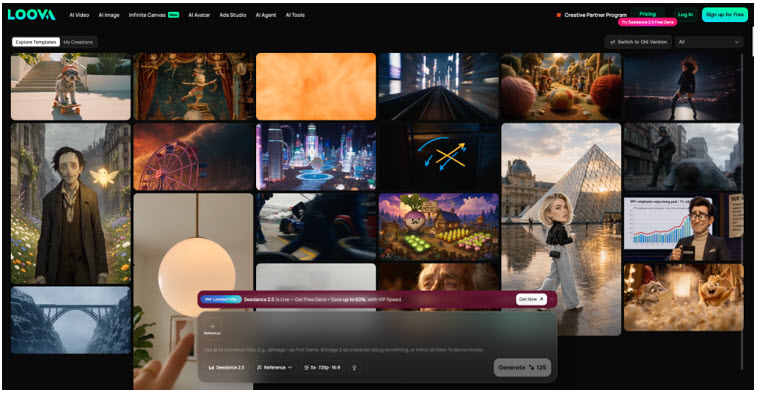
These sequences work particularly well as opening shots, transitions, dream sequences, or environmental cutaways between character scenes.
Combine AI With Live Action
The strongest independent films are often hybrids rather than completely AI-generated.
Live performances can provide emotional authenticity, while AI contributes environments, transitions, impossible camera movements, visual effects, or supplementary shots that would otherwise exceed the production budget.
This approach allows filmmakers to preserve the strengths of human acting while expanding the visual scale of the story.
Produce More With Less Time
For small studios, the biggest advantage of AI video software is not replacing creativity—it is reducing repetitive production work.
Instead of spending days building temporary concept art or organizing complex test shoots, filmmakers can evaluate ideas within hours. More time can then be spent on directing performances, refining the script, and improving the final edit.
Final Thoughts
Independent filmmaking has always been about solving creative problems with limited resources.
AI video generators do not remove the need for good writing, thoughtful directing, or careful editing. Those skills remain the foundation of every memorable film.
What these tools change is the scale of what a small team can realistically achieve.
Shots that once required expensive locations, large crews, or specialized visual effects can now be explored much earlier in the creative process. Directors can test ideas before production, iterate on difficult scenes, and build richer visual worlds without dramatically increasing the budget.
The most successful filmmakers will not be the ones who rely entirely on AI. They will be the ones who understand when AI should support the story—and when traditional filmmaking techniques remain the better choice.
FAQs
What is the best AI video generator for independent filmmakers?
There is no single best option. Loova is well suited to complete AI-assisted production, Runway offers strong cinematic control, Seedance 2.0 excels at narrative generation, Kling performs well with realistic characters, and Veo 3.1 produces highly photorealistic scenes.
Can AI create an entire short film?
Yes, but most successful projects combine several tools rather than relying on one model. AI can assist with concept art, storyboards, image generation, video generation, editing, and visual effects, while filmmakers still guide the creative direction.
Which AI video generator has the best character consistency?
Reference-based workflows generally provide the strongest consistency. Models that support multiple reference images and structured generation are usually more reliable for recurring characters than prompt-only approaches.
Can AI replace expensive filming locations?
AI can generate convincing establishing shots, fantasy environments, futuristic cities, and other difficult locations that would otherwise require significant travel or visual effects work. Many filmmakers use these shots alongside live-action footage.
Should filmmakers use one AI model or several?
Many independent creators combine different models. One tool may be better for realistic acting, another for cinematic camera movement, and another for stylized environments. Choosing the right model for each scene often produces stronger results than using a single platform throughout the project.
Is AI filmmaking suitable for professional productions?
Increasingly, yes. AI is already being used for concept development, previsualization, visual effects planning, marketing materials, and selected finished shots. Human creative direction, editing, and performance remain essential, especially for larger productions.
How can a solo filmmaker keep characters consistent across scenes?
Start by creating high-quality reference images for each main character, including consistent clothing, hairstyle, and facial details. Reuse those references throughout the project instead of generating every scene from scratch.
Can AI reduce production costs for small studios?
Yes. AI can lower costs by reducing the need for repeated test shoots, concept artists, expensive establishing shots, and some visual effects work. It is most effective when used to complement a well-planned production rather than replace every stage of filmmaking.
