
SPF Checker: Validate Sender Policy Framework Records Online
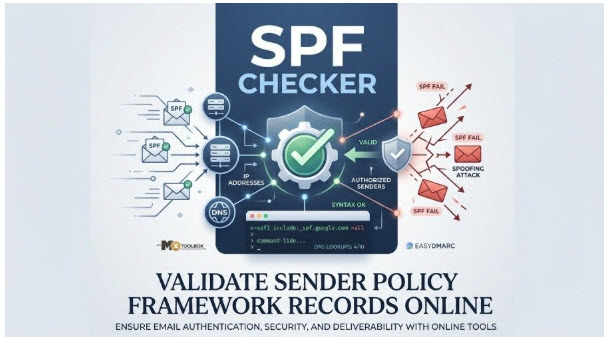
An SPF Checker helps you verify your domain’s Sender Policy Framework (SPF) record and ensure it is correctly configured in DNS. By checking SPF syntax, authorized sending servers, and DNS lookup limits, you can identify configuration errors that may affect email authentication and deliverability. Use an online SPF checker to detect issues, prevent email spoofing, and help legitimate emails reach recipients’ inboxes.
What an SPF Checker Is and Why SPF Records Matter
An SPF checker is an online tool that performs an SPF lookup against a domain’s DNS and evaluates whether its SPF record is valid, complete, and aligned with Sender Policy Framework rules. Because SPF is published as a DNS TXT record, an SPF checker retrieves the TXT record, parses the policy, and reports whether the domain has configured email authentication correctly.
A properly configured Sender Policy Framework policy helps receiving systems determine whether a sending mail server is an authorized sender for a domain. This matters because attackers often use email spoofing to send a fraudulent email that appears to come from a trusted organization. Without SPF, mailbox providers have less evidence to distinguish legitimate email from a phishing attack or email impersonation attempt.
Tools like AutoSPF make it far easier to maintain a correct, effective SPF policy by automatically flattening records, staying within the 10-DNS-lookup limit, and continuously updating authorized IP ranges so your authentication stays reliable.
SPF checker vs. SPF validator vs. SPF lookup tool
The terms are often used interchangeably, but they emphasize slightly different functions:
● An SPF checker performs a live SPF check against DNS.
● An SPF lookup tool retrieves and displays the domain’s SPF-related DNS record.
● An SPF validator evaluates SPF syntax, mechanisms, DNS lookup count, and policy behavior.
● An SPF diagnostic tool may also identify issues such as too many DNS lookups, SPF multiple records, or an SPF permerror.
Tools such as MxToolbox, EasyDMARC, an SPF Record Checker, and an SPF Diagnostic Tool can help confirm that an SPF record exists, that the DNS TXT record is published correctly, and that receiving Mailbox Providers can interpret it.
Why SPF supports email authentication and deliverability
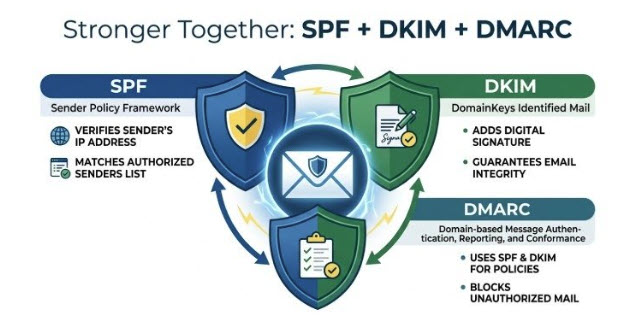
SPF is one part of modern domain authentication, along with DKIM and DMARC. DKIM validates message integrity using cryptographic signatures, while DMARC—short for Domain-based Message Authentication Reporting and Conformance—tells mailbox providers how to handle messages that fail SPF or DKIM alignment.
When SPF is configured correctly, a receiving mail server can return an SPF pass result if the sending IP address is permitted. If the sender is not authorized, the result may be SPF fail, SPF soft fail, or SPF hard fail, depending on the policy. This helps improve email security, reduce email spoofing, and protect sender reputation, all of which influence email delivery at providers such as Google, Microsoft, and Verizon.
How SPF Records Work: Domains, IP Addresses, Includes, and Mechanisms
An SPF record is a specific type of DNS TXT record published for a domain. It lists which servers, services, and third-party platforms are permitted to send email on behalf of that domain. Under RFC 7208, SPF is evaluated by comparing the connecting IP address of the sending mail server against the policy published in DNS.
Core structure of an SPF record
A basic SPF record begins with the SPF tag:
v=spf1 ip4:192.0.2.10 include:*thirdpartydomain.com* -all
In this example, v=spf1 identifies the Sender Policy Framework version. The ip4 value authorizes a specific SPF IP address, the SPF include authorizes another domain’s sending infrastructure, and -all tells receivers to apply a strict failure if no match is found.
The final SPF all mechanism is important because it defines the default result when no previous
SPF mechanism matches. Common SPF qualifiers include:
● +all: pass, generally unsafe
● ~all: SPF soft fail
● -all: SPF hard fail
● ?all: neutral
Common SPF mechanisms
SPF supports several mechanisms that describe an authorized sender:
● ip4 and ip6 authorize a specific IP address or range.
● include authorizes another domain’s SPF policy, such as include:*thirdpartydomain.com*.
● a allows the domain’s A record IP address to send.
● mx allows hosts listed in the domain’s MX record to send.
● *ptr* exists in SPF but is discouraged because PTR lookups are inefficient and unreliable.
A more complex SPF record might include multiple vendors:
v=spf1 ip4:192.0.2.10 include:*thirdpartydomain.com* include:*anotherthirdpartydomain.com* ~all
This type of policy is common when a business uses a corporate mail server, a marketing platform, and a help desk tool. Each third-party sender must be represented accurately so that legitimate messages achieve SPF pass instead of SPF fail.
Includes and lookup limits
Every SPF include, a, mx, exists, and redirect can trigger DNS queries. SPF permits only 10 DNS lookups during evaluation. If a domain exceeds that limit, receivers may return too many DNS lookups and generate an SPF permerror. A good SPF validator or SPF lookup report will highlight this problem before it damages authentication results.
When “SPF exists” matters
The existing mechanism is less common but can be used for advanced authorization logic. If an SPF mechanism causes unnecessary DNS overhead, simplify the policy or replace it with explicit IP ranges.
How to Use an Online SPF Checker to Validate Your DNS Record
Using an online SPF checker is straightforward, but interpreting the results requires understanding what the tool is testing. A quality SPF check tool does more than confirm that a DNS TXT record exists; it evaluates structure, includes, syntax, and likely receiver behavior.
Step-by-step SPF validation process
- Enter your domain into an SPF lookup tool, such as MxToolbox, EasyDMARC, or another SPF Record Checker.
- Run the SPF lookup to retrieve the TXT record from DNS.
- Confirm that only one SPF record is published for the domain.
- Review the SPF syntax for invalid characters, unsupported mechanisms, or malformed includes.
- Check whether every sending service is listed as an authorized sender.
- Run an SPF test to identify lookup-count issues, missing IP ranges, and potential SPF error conditions.
If the tool reports that no SPF record exists, log in to your DNS hosting provider or domain registrar and add the appropriate TXT record. Some platforms also provide an SPF record generator or SPF Record Generator that builds a starting policy based on your sending sources.
What a good SPF validator should report
A reliable SPF validator should show the published DNS TXT record, explain whether SPF validation passes, and identify the result a receiving mail server is likely to return. It should also detect:
● Duplicate SPF policies
● Invalid mechanisms
● Missing third-party senders
● Excessive DNS lookups
● Risky +all configurations
● Incorrect use of include, mx, a, or *ptr*
Because MBPs and each mailbox provider may apply authentication signals differently, a clean SPF record check helps reduce unpredictable filtering and improves email delivery.
Common SPF Record Errors and How to Fix Them
Even a small SPF error can cause legitimate email to fail email authentication. The most common problems usually come from DNS misconfiguration, vendor changes, or misunderstanding how Sender Policy Framework evaluation works.
SPF multiple records
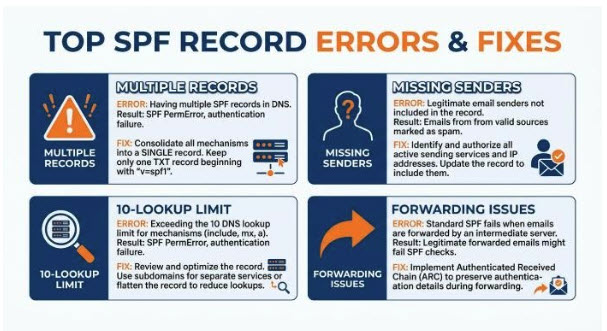
A domain must not publish more than one SPF policy. If DNS contains two separate DNS TXT record entries such as:
v=spf1 include:*thirdpartydomain.com* -all
v=spf1 include:*anotherthirdpartydomain.com* -all
receivers may return SPF permerror because of SPF multiple records. The fix is to merge them into one SPF record:
v=spf1 include:*thirdpartydomain.com* include:*anotherthirdpartydomain.com* -all
Missing or incorrect authorized sender
If a legitimate platform is not listed, its messages may produce SPF fail. Add the correct SPF include, IP range, or mechanism supplied by the vendor. For example, if a CRM, ticketing system, or marketing platform sends from your domain, it must be included as a third-party sender and treated as an authorized sender in the policy.
Too many DNS lookups
The 10-lookup limit is one of the most frequent issues found by an SPF checker. To fix too many DNS lookups, remove unused includes, flatten stable IP ranges carefully, or consolidate vendors. However, SPF flattening requires maintenance because provider IP ranges can change.
SPF forwarding and alignment problems
SPF forwarding can cause complications because forwarded mail may arrive from an intermediate mail server that is not authorized in the original domain’s SPF record. In that case, SPF can fail even though the original sender was legitimate. This is why DKIM and DMARC are essential companions to SPF for broader email authentication and email spoofing prevention.
Best Practices for Maintaining SPF Authentication and Email Deliverability
SPF is not a one-time setup task. Maintaining a strong Sender Policy Framework policy requires regular review, especially as organizations add new sending platforms, migrate email systems, or change DNS providers.
Keep your SPF record accurate and minimal
Every mail server or vendor that sends email for your domain should be listed, and every obsolete source should be removed. A concise SPF record is easier to audit, less likely to exceed lookup limits, and more reliable for SPF validation.
Use an SPF checker after any change to your DNS TXT record. A quick SPF lookup can confirm whether the update has propagated and whether the new policy still returns the expected SPF pass for legitimate senders.
Pair SPF with DKIM and DMARC
SPF alone is not enough to stop every form of email spoofing or email impersonation. Pairing SPF with DKIM and DMARC gives mailbox providers stronger authentication evidence and gives domain owners better visibility into abuse. DMARC reports can reveal unauthorized systems, misconfigured vendors, and suspicious sources attempting to send from your domain.
Monitor sender reputation and mailbox provider behavior
Major receivers such as Google, Microsoft, Verizon, and other Mailbox Providers evaluate authentication, engagement, complaint rates, and infrastructure quality. Strong email security practices, consistent domain authentication, and a valid SPF record support better sender reputation.
Run a periodic SPF lookup, especially after adding a new SaaS platform, changing your domain registrar, updating your DNS hosting provider, or modifying an MX record. A routine SPF record check with an SPF checker, SPF validator, or SPF diagnostic tool helps ensure the DNS TXT record remains valid, your authorized sender list is current, and your domain is protected against email spoofing.
