
Proxy vs VPN: What's the Difference and Which One Do You Need on Linux?
TL;DR
The proxy vs VPN difference fits in one line: a proxy relays traffic for the programs you point at it, and a VPN routes traffic from every process through an encrypted tunnel. Both change the IP address a website sees. Only the VPN encrypts that traffic and covers the whole system.
• Use a proxy when one program needs a different exit point, like a browser profile over ssh -D or apt behind a corporate proxy.
• Use a VPN when every process needs protection on a network you don't run.
• Neither one makes you anonymous. Your IP address is only one signal sites use to recognize you.
What Is a Proxy Server?
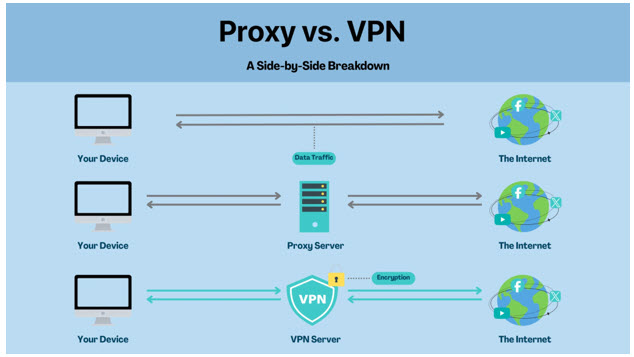
A proxy server is a relay. A program sends its request to the proxy, the proxy opens the connection to the destination, and the destination sees the proxy's IP address instead of yours.
Two kinds cover most Linux use. An HTTP proxy handles web requests and uses the CONNECT method to pass HTTPS through unchanged. A SOCKS5 proxy (RFC 1928) relays any TCP connection and defines a UDP mode that few clients support. Programs opt in one at a time: through the http_proxy and https_proxy variables, through their own settings such as APT's Acquire::http::Proxy, or through a wrapper like proxychains. This walkthrough on configuring proxy servers on Linux covers each method.
Anything that hasn't opted in goes out directly, with your real address. And the proxy itself can read every request that isn't already protected by TLS.
This is where a free proxy and a free VPN part ways. Both hand you a new IP address. Only the VPN puts every connection on your device inside an encrypted tunnel.
Pros
• Changes the IP address the destination sees
• Scoped to one program or one browser profile
• Needs no root access for a user-level setting
Cons
• Adds no encryption of its own
• Covers only the programs set up to use it
• Leaves DNS with your local resolver unless the client hands hostnames to the proxy
What Is a VPN?
A VPN (virtual private network) adds a virtual network interface, such as tun0 or wg0, and changes the routing table so traffic from every process leaves through an encrypted tunnel to a VPN server.
On the local network and at your ISP, that traffic shows up as encrypted packets going to one server address. Neither can read which hosts you reach or what you send. The VPN provider now sits where your ISP used to, so its logging policy matters as much as its encryption.
Because the change happens in the routing table, no program needs its own settings, and DNS follows the tunnel when the client routes it there. For the longer version, see what a VPN is and how it works.
Pros
• Encrypts traffic between the machine and the VPN server
• Covers every process, including services and cron jobs
• One connection protects the whole system
Cons
• Adds encryption overhead and an extra hop
• Needs root, or a privileged client, to change routes
• Shifts trust from your ISP to the VPN provider
• Some services flag known VPN address ranges
Proxy vs VPN: A Side-by-Side Comparison
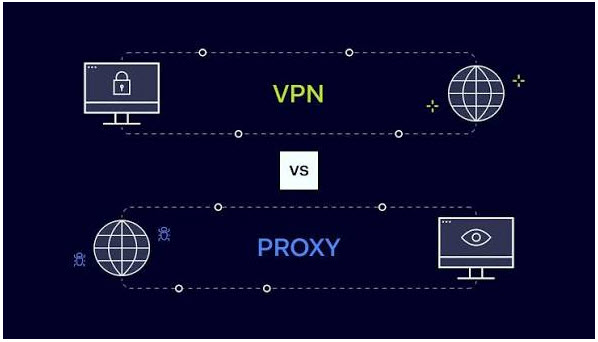
Both can change the IP address a site sees. Past that, they split on encryption, coverage, DNS, and what happens to traffic the tool doesn't handle.
|
Feature |
Proxy |
VPN |
|
Changes the IP a Website Sees |
✅ |
✅ |
|
Encrypts Your Traffic |
❌ |
✅ Between your machine and the VPN server |
|
Covers Every Process on the Machine |
❌ Only programs set up for it |
✅ |
|
Encrypts Traffic on Untrusted Wi-Fi |
❌ |
✅ |
|
Keeps Destinations Unreadable to Your ISP |
❌ |
✅ |
|
Stops Browser Fingerprinting |
❌ |
❌ |
|
Covers DNS Lookups |
⚠️ Only for proxied requests, and SOCKS5 needs socks5h |
✅ When the client routes DNS into the tunnel |
|
Carries UDP Traffic |
❌ HTTP proxy / ⚠️ SOCKS5, client-dependent |
✅ |
|
Overhead |
✅ Low |
⚠️ Some: encryption and an extra hop |
|
Best For |
One program, low-risk tasks |
System-wide protection on networks you don't run |
The proxy column assumes a plain HTTP or SOCKS5 proxy. Reaching the proxy over TLS or ssh -D encrypts that hop, for proxied programs only.
Encryption and Privacy
HTTPS stays encrypted between your browser and the site, even through an HTTP proxy's CONNECT tunnel. Plain HTTP doesn't: whoever runs the proxy can read and change it.
DNS is the quieter gap. With a SOCKS5 proxy, curl resolves hostnames on your own machine unless you pass --socks5-hostname or use a socks5h:// URL, so every lookup still goes to your usual resolver. This guide to DNS leaks around a proxy walks through the fixes.
A VPN encrypts the packets themselves, DNS included when the client routes it into the tunnel.
Coverage: One Process vs the Whole System
Proxy settings reach only processes that inherit and honor them, and on Linux that leaves gaps. sudo resets the environment by default, so http_proxy is dropped unless sudoers keeps it. systemd services don't read your shell profile. curl ignores an uppercase HTTP_PROXY. proxychains hooks libc through LD_PRELOAD, so static binaries and Go programs that skip libc connect directly.
A VPN works one level down. The kernel routes every packet through the routing table, no matter which process sent it.
Setup and Ease of Use
A proxy is an export line or a setting in each tool, quick to add and easy to scatter across shell profiles, APT config, and browser settings. A VPN is one connection: wg-quick up wg0, nmcli connection up, or a provider's client. It needs root once, and then no program needs its own settings.
Speed: Less Overhead Isn't the Same as Better
A proxy adds a hop but no tunnel encryption, so its overhead is lower. A VPN adds encryption, encapsulation, and the trip to the VPN server. On current hardware, server distance and load matter more than the cipher. Either way, expect some added latency.
Use Cases
A proxy fits package downloads through a corporate egress proxy, a browser profile over ssh -D, or a caching proxy for a lab. A VPN fits a laptop on hotel Wi-Fi, or a host where daemons, CLI tools, and the browser need one protected path.
Important: Changing Your IP Does Not Make You Fully Anonymous
A proxy or a VPN changes the IP address a site sees. It doesn't change the other signals that identify you.
Sites also read cookies and logged-in sessions, and they can recognize your browser through browser fingerprinting, which draws on canvas, WebGL, fonts, and screen details. DNS still goes to your usual resolver when the tunnel or proxy doesn't carry it, and WebRTC in a browser can expose addresses the proxy doesn't see.
A VPN protects more at the connection level, but it doesn't make you invisible to the sites you sign in to.
When Should You Use a Proxy (and When Shouldn't You)?
Use a proxy when one program needs a different exit point and the data it carries is public or already protected by TLS. Once credentials, private data, or networks you don't run are involved, use a VPN.
Use a Proxy If You:
• Need one program to exit through a specific host
• Work behind an egress proxy your network requires
• Want a quick SOCKS endpoint over SSH to a server you already trust
Use a VPN If You:
• Want every process covered, including services and cron jobs
• Need traffic encrypted between your machine and a server you choose
• Connect from hotel, conference, or café Wi-Fi
• Don't want the local network or your ISP reading which hosts you reach
• Sign in to accounts, move files, or administer systems over the connection
How to Choose the Right Proxy and VPN
Pick the tool by the job, then vet the provider.
What to Look for in a Proxy
Transparency Policy
Look for a published policy on what gets logged and for how long. Skip free proxies that publish nothing.
HTTPS Support
You want CONNECT support so HTTPS passes through unchanged, and a TLS connection to the proxy so your credentials don't cross the network in the clear.
Reputation
Go with a known operator that lists an abuse contact and has a track record you can check.
Proxy Type
HTTP(S) for web traffic and package managers. SOCKS5 for other TCP programs, or for proxy-side DNS through socks5h. Stay off open proxies.
What to Look for in a VPN
Encryption Standard
Expect modern authenticated ciphers, such as AES-256-GCM or ChaCha20-Poly1305 (the cipher WireGuard uses), with forward secrecy in the key exchange.
Audited No-Logs Policy
A no-logs policy is a claim. An independent assessment is evidence. Check the standard, the scope, and the date. X-VPN, for example, had its no-logs policy independently assessed under ISAE 3000 (Revised), with results published in 2026.
Server Coverage
Choose servers near you and near the systems you reach. Distance drives latency more than anything else.
Device and Platform Support
The client should run on your distribution and architecture, with a command-line mode for headless servers.
Speed and Performance
Test from where you work. Overhead, distance, and load decide what you get, so published numbers rarely match your setup.
Leak Protection and DNS Handling
The client should send DNS through the tunnel and either tunnel IPv6 or block it. Check after you connect: tcpdump -ni <interface> port 53 on the physical interface should stay quiet while you browse.
The Bottom Line
The proxy vs VPN decision on Linux comes down to routing. A proxy is something each program opts into. A VPN is a route the kernel applies to every process. Use a proxy when one program needs a different exit and nothing sensitive rides on it. Use a VPN when the whole machine needs an encrypted path, particularly on networks you don't run.
Moving From a Proxy to a VPN on Linux
Switching from per-program proxy settings to a VPN takes three steps: bring the tunnel up, clear out the old proxy settings, and check where packets and DNS queries go.
Bring the tunnel up with wg-quick up wg0, with nmcli connection up after importing a WireGuard or OpenVPN profile, or with your provider's own client. X-VPN's Linux client is a command-line tool that needs a Premium account. xvpn connect brings the tunnel up, and xvpn status shows the connection state, location, and protocol. On a headless server, xvpn login --via-passcode signs you in with a code from a device that's already logged in.
Next, remove the old http_proxy and https_proxy exports and per-tool settings such as APT's proxy line, so nothing keeps sending traffic to the proxy.
Then check that ip route get 1.1.1.1 names the tunnel interface and that a DNS leak test shows the VPN's resolver, not your ISP's. This look at why VPNs still matter for Linux users covers the bigger picture.
