
Is Vidnoz AI Really Worth It? A Complete Review
In a fast-evolving world of content creation, Vidnoz AI has emerged as one of the most powerful AI-driven video creation tools designed to make creating videos easier and more efficient. It comes with a wide range of innovative features tailor-made to fit today’s content demands, from personalized avatars and voiceovers to smart editing and customization options. But with so many AI solutions available, the big question remains — is Vidnoz AI truly worth the hype? In this comprehensive review, we’ll explore its key features, benefits, drawbacks, and pricing to help you decide whether Vidnoz AI is the right tool for your creative or professional needs.
Part 1: An Overview of Vidnoz AI
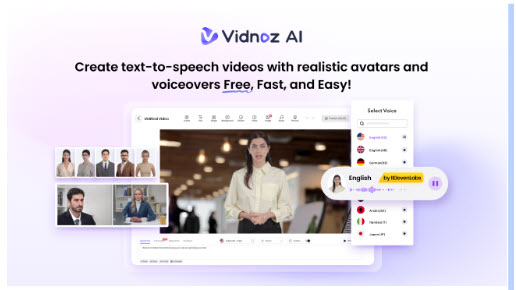
When it comes to content creation, the first tool that comes to mind is Vidnoz AI. It is an all-in-one AI video generator, which allows users to create high-quality videos using a simple text prompt or any source material. Unlike traditional editing software, Vidnoz AI leverages advanced artificial intelligence to automate time-consuming processes, making video production faster, easier, and more accessible. The standout feature of this tool is that it is certified with ISO/IEC 27001:2022 for Information Security Management. Further, various AI tools are available for users to create splendid videos for learning, business, news, social, etc.
Part 2: Powerful Features of Vidnoz AI
Vidnoz AI stands out for its wide range of features designed to simplify and elevate video creation. Here are the top features of this program:
- Video Templates: The program offers 2800+ video templates, allowing users to create different types of videos, including how-to guides, tutorials, product demos, breaking news, and more. Further, a great variety of aspect ratio templates, including landscape and portrait, are also available to match the display requirements of different devices.
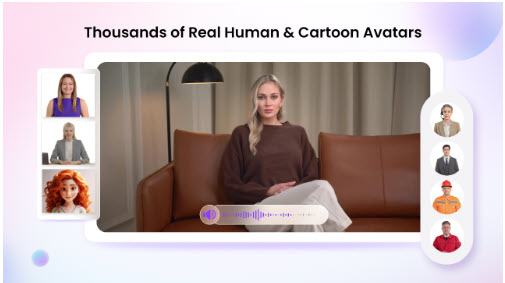
- Realistic AI Avatars: Vidnoz AI includes 1700+ AI avatars from different industries and roles such as doctors, hosts, customer supporters, chiefs, teachers, and students. Plus, users can also do quick creations using Avatar Lite, and Avatar Pro offers deeper customization.
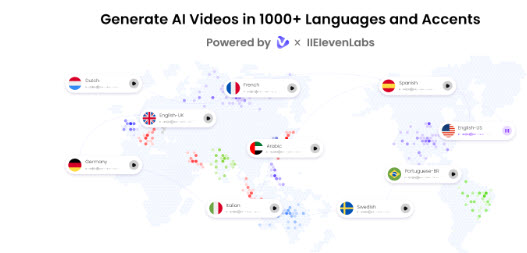
- Lip Sync AI Voices: This tool provides 1830+ natural-sounding AI voices in 140+ languages, each with unique accents and tone. All voices available on this program are powered by ElevenLabs, Microsoft, and Google. Additionally, with voice cloning, users can create a synthetic voice using audio recordings that resemble 99% of the real voice.
- AI Video Wizard: With the help of this program, users can create videos without professional help or editing skills. The Vidnoz AI Video Wizard feature allows you to create high-quality videos with a simple text prompt or any source material.
- Free to Use: The best part of Vidnoz AI is that it offers a free version, allowing users to create high-quality videos without spending a single dime. Free version enables users to create a 3-minute video daily and includes features like Avatar Lite, Online Video Editor, and more.
Part 3: Pros and Cons of Vidnoz AI
Vidnoz AI comes with its strengths and limitations. Here are the pros and cons of Vidnoz AI:
Pros
- Offers a wide range of free tools such as Avatar Lite, AI Voice Changer, Online Video Editor, and more.
- Support various devices, including Android, iOS, Windows, and macOS.
- Best for content creators, marketers, small businesses, and educators.
- Ability to accommodate up to 1000 members.
- Dual-avatar mode allows users to get two avatars to talk with each other in a scene.
Cons
- Require a stable internet connection to create high-quality videos easily
Part 4: How to Use Vidnoz AI to Create Videos?
Follow the instructions below to create high-quality videos with Vidnoz AI for free:
- Navigate to Vidnoz AI's official site and log in with your free account. Choose the Video Template and AI Avatars.
- Enter your video script and select the AI voices. Users also have the option to choose the language of their videos.
- Use Online Video Editor to customize AI videos, such as changing the background, adding music, inserting text, and more.
- Finally, click on the “Generate” button to begin the video creation process. Within seconds, your video will be ready and available to download on PC.
Part 5: Conclusion
Vidnoz AI is one of the best tools for video creation. It offers amazing features and capabilities, which allow creators to generate hundreds of videos daily without any editing experience. Further, it offers a free version, an AI video translator, an AI voice changer, and more.
