
How to Make an AI Movie by Routing Shots in One Studio Workflow
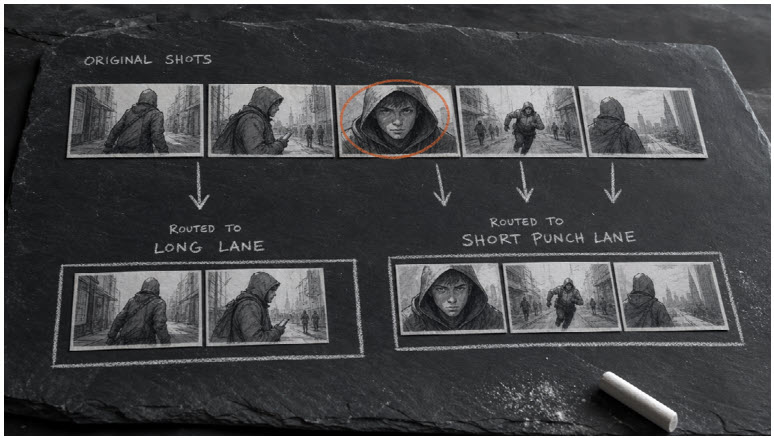
Search demand for an AI movie maker is not really about one magic prompt. Creators want a way to turn a script into multiple cuttable shots — then assign the right model to each shot without rebuilding the project every time.
That is the practical job of a film-studio workflow: keep story, boards, and scene direction in one path, then route generation to the engine that fits the beat. On Topview, two strong options for that routing are Seedance 2.5 and MiniMax H3.
This guide is a shot-routing playbook for AI movies. It is not another “best platforms” list, and it is not a micro-drama episode guide.
What “Routing Shots” Means
In traditional production, different scenes get different packages: one unit for dialogue coverage, another for VFX-heavy inserts, another for product beauty.
AI movies need the same logic:
- Lock story and coverage in the studio workflow
- Label each beat by job (dialogue, reveal, transition, commercial pack shot)
- Send that beat to the model that matches duration, reference control, and audiovisual needs
- Bring approved clips back into one edit
If every shot uses the same model settings, you either overspend or under-deliver.
Step 1: Build the Movie in the Studio Layer First
Before model choice, finish the director packet:
● Scene cards (objective, location, cast, emotion)
● Storyboards in cut order
● Camera notes (shot size, move, eyeline)
● Continuity locks (face, wardrobe, world)
The film studio layer exists so Seedance and MiniMax receive directed beats instead of vague wishes. If the board is unclear, no model will invent a coherent movie.
Step 2: Label Every Beat With a Generation Job
Use a simple tag on each board frame:
|
Tag |
Typical need |
|
MASTER |
Geography and blocking |
|
PERF |
Performance / dialogue pressure |
|
HERO |
High-detail cinematic moment |
|
VFX |
Surreal transition, orbit, transformation |
|
PRODUCT |
Pack shot / brand commercial clarity |
|
BRIDGE |
Short connective motion |
Your routing decisions come from these tags, not from which model is trending that week.
Step 3: Route Longer Cinematic Beats to Seedance 2.5
Choose Seedance 2.5 when the beat needs:
● Longer cinematic motion (up to around 30 seconds)
● Strong scene continuity after boards are locked
● Multimodal inputs (text, image, video, audio references)
● A hero moment that must hold detail across a longer take
Good Seedance assignments:
● Opening oner that establishes the world
● Emotional push-in that cannot feel truncated
● Mid-film set piece where pacing needs room to breathe
Prompt pattern:
Use the approved board and character sheet. Medium shot into slow push-in. Keep navy coat and short dark hair. Station clock stays in frame left. No wardrobe redesign.
Seedance is the execution layer for directed, longer cinematic pressure.
Step 4: Route Multimodal / Native-AV Beats to MiniMax H3
MiniMax H3 (available on Topview as an open-weight video model with multimodal control) is a strong fit when the beat needs:
● Text + image/video/audio reference control
● Native audiovisual output
● Tight cinematic clips in a shorter window (about 5–15 seconds)
● Fluid VFX-style transitions or polished commercial construction
From the model’s own use-case pattern, it handles lanes like:
● Cinematic fantasy transitions with identity preserved across environments
● Brand commercials with pack shots, macros, and clean end cards
● Creature/action bursts
● Anime-style storytelling beats
● Post-apocalyptic drama punches
Good MiniMax H3 assignments:
● 10–15s commercial insert inside a larger AI movie
● Identity-locked transformation / portal / orbit move
● Short high-motion bridge that needs synced audiovisual energy
● Product hero moments that must keep label detail readable
Prompt pattern:
Preserve @Image1 identity and wardrobe. 12-second continuous transition from neon night skyline into daylight crosswalk. Fluid fabric physics, cinematic lighting, no face redesign.
Use MiniMax H3 as a precision unit, not as a random second generator.
Step 5: A Practical Routing Matrix
|
Beat type |
Prefer |
Why |
|
20–30s cinematic scene |
Seedance 2.5 |
Longer duration headroom |
|
5–15s VFX transition |
MiniMax H3 |
Multimodal refs + native AV punch |
|
Brand pack-shot commercial beat |
MiniMax H3 |
Commercial clarity examples fit this lane |
|
Dialogue master needing hold |
Seedance 2.5 |
Longer stable performance window |
|
Quick insert / action spike |
MiniMax H3 |
Short, controlled generation |
|
Whole-movie structure |
Film studio workflow |
Storyboards + direction before any model |
If you are unsure, default rule:
● Story length and continuity pressure → Seedance 2.5
● Reference-heavy transformation or commercial polish in a short clip → MiniMax H3
Step 6: Assemble Like an Editor, Not Like a Prompt Hoarder
After generation:
- Drop clips onto a timeline in board order
- Check eyelines and screen direction
- Replace only failing beats (do not regenerate the whole movie)
- Keep audio strategy intentional — especially when a clip arrives with native audiovisual energy from MiniMax H3
- Export one cut, then do a continuity pass for cast and wardrobe
The studio workflow is what keeps Seedance shots and MiniMax shots inside one movie grammar.
Example: 60–90 Second AI Movie Plan
- Cold open (12s transformation) → MiniMax H3
- Dialogue master (20–25s) → Seedance 2.5
- Insert + reaction (8s) → MiniMax H3
- Closing wide hold (15–20s) → Seedance 2.5
- Optional brand button (10–15s) → MiniMax H3
Same cast sheet. Same world lock. Different engines by beat.
Common Mistakes
● Picking one model for every shot out of habit
● Sending undirected prompts to Seedance or MiniMax and blaming the model
● Mixing wardrobe identity between engines because references were not shared
● Using MiniMax’s short cinematic strength for a beat that needed a 30-second hold
● Using Seedance for a 6-second pack shot that needed commercial label clarity
FAQ
Is an AI movie maker the same as a single video model?
No. A movie maker workflow plans and sequences shots. Models generate the frames and motion for those shots.
Should I always prefer the newest model?
Prefer the model that matches the beat: duration, references, audiovisual needs, and continuity constraints.
Can Seedance 2.5 and MiniMax H3 appear in the same final cut?
Yes — that is the point of routing. Keep continuity locks identical across both.
Final Takeaway
To make an AI movie with real shot control, stop asking one model to do every job. Use the film studio workflow to direct the movie, route longer cinematic holds to Seedance 2.5, and route short multimodal or commercial/VFX punches to MiniMax H3.
That is how an AI movie maker setup becomes production — not a folder of unrelated clips.
