
How a Phone Selfie Monitor Screen makes Solo Filming Easier
A phone selfie monitor screen makes it easier to record yourself using your smartphone's rear camera. Instead of guessing whether you are properly framed, you can watch a live preview while taking photos, recording videos, or livestreaming.
For vloggers, travelers, and social media creators, this simple accessory can make a significant difference. But what exactly does it do, and how do you choose the right one? This guide explains everything you need to know.
What is a phone selfie monitor screen?
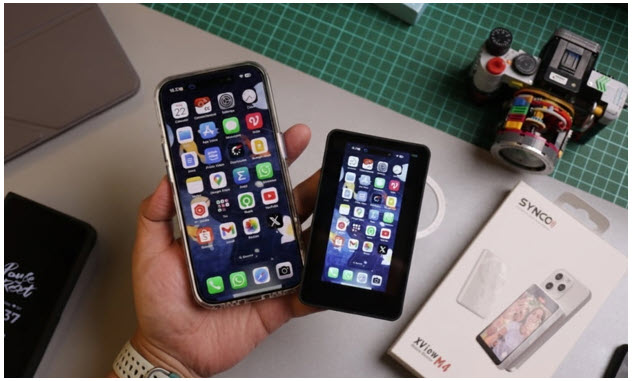
A phone selfie monitor screen is a compact external display that connects to a smartphone and shows what its camera is capturing.
Most models are designed to help users film themselves with the rear camera. They attach to the back of a phone, allowing users to see their composition while facing the camera lens.
For example, the SYNCO XView M4 provides wireless screen mirroring, magnetic mounting, and remote shutter control for mobile photography and video recording.
Unlike a conventional computer monitor, a selfie monitor is small, lightweight, and designed for portable use. It does not replace the phone's camera or improve its sensor. Instead, it makes the existing camera easier to use for self-recording.
Why use a selfie monitor instead of the front camera?
Modern smartphones already have front-facing cameras, so an additional monitor might seem unnecessary.
However, rear cameras often provide advantages that make an external preview screen useful.
Take advantage of the rear camera's capabilities
On many smartphones, the main rear camera has a larger sensor, better low-light performance, or more advanced recording options than the front camera.
Using the rear camera may produce sharper details, improved dynamic range, and better image quality in challenging lighting conditions.
A selfie monitor makes these capabilities accessible when filming yourself, without requiring someone else to operate the phone.
Check framing while recording
One of the biggest challenges of rear-camera selfies is not knowing what the camera sees.
Without a monitor, users may accidentally cut off their heads, leave too much empty space, or move outside the frame.
Phone monitors provide a live preview, allowing creators to adjust their position before and during recording.
This is especially helpful when filming alone with a tripod.
Reduce unnecessary retakes
Imagine recording a ten-minute tutorial only to discover that your face was partly outside the frame.
A selfie monitor helps users identify composition problems early.
Depending on the display quality and connection delay, it can also help them notice major changes in lighting, camera position, and background composition.
This reduces the need to repeatedly stop filming and review footage.
How does a phone vlog selfie monitor screen work?
Most phone vlog selfie monitor screens connect through wired or wireless technology.
Wireless models may use direct screen mirroring or other compatible transmission methods to display the phone's camera preview.
Some monitors establish direct connections without requiring an external Wi-Fi network. Others use cables or dedicated applications.
Once connected, users can position the monitor where they can easily see it while facing the rear camera.
Depending on the model, additional functions may include:
● Screen mirroring: Display the phone's camera preview on an external screen.
● Wireless shutter: Take photos or start compatible recording functions remotely.
● Screen rotation: Adjust the preview orientation for different shooting angles.
● Touchscreen control: Change supported camera settings without reaching for the phone.
● Adjustable brightness: Make the display easier to see under different lighting conditions.
These features vary between products. A basic monitor may only display the camera preview, while more advanced models offer camera controls and additional shooting functions.
When is a phone selfie monitor screen useful?
Although selfie monitors are often associated with influencers, they can improve many everyday recording situations.
Vlogging and travel videos
Travel vloggers frequently film themselves while walking, introducing destinations, or describing their experiences.
A phone selfie monitor lets them use the rear camera while checking whether their face and background remain visible.
Compact models are particularly convenient because they can fit into a small camera bag.
Beauty and makeup tutorials
Beauty creators often need to show fine details, including makeup application, facial expressions, and product textures.
Using the rear camera may help capture these details more clearly.
An external monitor also helps creators check their position when filming close-up demonstrations.
Fitness and instructional videos
Fitness instructors, cooking enthusiasts, and online educators regularly record demonstrations without another person behind the camera.
A selfie monitor can help them confirm that their movements or equipment remain visible.
When paired with a tripod and remote shutter, it also allows them to start recording without repeatedly returning to the phone.
Group selfies and social media content
A selfie monitor is not limited to individual creators.
Friends and families can use one to compose group photos with the rear camera.
Some monitors support wireless shutter controls, making it easier to take pictures from a distance after everyone has entered the frame.
How to choose a selfie monitor screen for iPhone and Android
Not every monitor works with every smartphone. Before purchasing, consider the following features.
Check phone compatibility
When choosing a selfie monitor screen for iPhone, check the supported iPhone models and iOS versions.
Some monitors use MagSafe-compatible magnetic mounting, which makes installation convenient on supported devices.
For Android users, compatibility requires additional attention. A vlog selfie monitor screen for Android may support certain manufacturers or models but not others.
Check both the screen-mirroring connection and camera-control compatibility. A monitor that displays the phone screen may not necessarily support remote adjustments to camera settings.
Compare wireless and wired connections
Wireless models are convenient for quick setup and everyday filming because they reduce cable clutter.
Wired models can provide a stable connection, depending on the phone's video-output capabilities and the monitor's supported interface.
If you frequently move between indoor and outdoor locations, wireless connectivity may be more practical.
Consider screen size and brightness
A small screen is easier to carry, but it may be difficult to view from a distance.
Larger displays make framing more convenient, especially when the phone is mounted on a tripod.
Brightness also matters. A monitor that works well indoors may become difficult to see under direct sunlight.
Look for convenient camera controls
Remote shutter control, touchscreen functionality, and gesture recognition can simplify solo recording.
For example, a remote shutter allows users to begin recording while standing away from the phone, provided the camera app supports that function.
When comparing phone monitors, consider which features you will actually use instead of choosing the model with the longest feature list.
Evaluate battery life and portability
Portable monitors typically use rechargeable batteries.
Choose a model that can last through your usual filming sessions, and consider charging convenience if you record for several hours.
A lightweight monitor with a secure mounting system is also more comfortable for handheld shooting.
Tips for getting better videos with a selfie monitor
Buying a monitor is only the first step. A few simple recording habits can further improve your results.
1. Look toward the camera lens. Use the monitor to check your composition, but look at the lens when speaking directly to viewers. This creates more natural eye contact.
2. Set up good lighting. Face a window or use a soft LED light. An external monitor cannot compensate for poor lighting by itself.
3. Keep the phone stable. A tripod or secure phone mount reduces camera shake and helps maintain consistent framing.
4. Test the connection before recording. Check the preview delay, screen orientation, and remote controls before starting an important video.
5. Record a short test clip. Review the footage to confirm that the focus, framing, exposure, and audio meet your expectations.
These simple steps can help both beginners and experienced creators work more efficiently.
Conclusion
A phone selfie monitor screen is a useful accessory for anyone who wants to record better selfies, vlogs, or tutorials using a smartphone's rear camera.
It provides a convenient way to check framing, reduce recording mistakes, and work independently without a camera operator.
Whether you use an iPhone or Android device, choosing a compatible monitor with the right display, connection method, and controls can make everyday content creation easier.
