
Boosting Blog Engagement with CapCut’s AI Image Generator
One of the most important sources of blog engagement is visual content. Articles with good quality images not only get more click-through rates but also get more reader retention and share of the articles. Nonetheless, graphic design skills are frequently needed to create attractive images, and it might be a lengthy process; not every blogger has the time and ability to engage in it.
An easy-to-use solution can be found in CapCuts AI Image Generator, which allows bloggers and content creators to do it. This tool is capable of transforming basic text prompts into high-quality images, which allow bloggers to create attractive images in articles, featured images, posts on social media, and infographics effortlessly. This enables bloggers to improve content and draw readers, as well as to provide the consistency of the look across the blogs without having to possess a wide range of design experience.
How AI Image Generator Enhances Blog Visuals
Visual presentation is the key to getting attention and an effective way of passing information in the competitive blogging field. Conventionally, bloggers use stock images, design applications, or outsource to generate images, which may be restrictive or costly. The AI logo generator provides a more creative substitute, creating logos of high quality, customizable images directly out of text prompts.
The tool enables the blogger to create images that can be specific to their article content, such as illustrations, infographics, and abstract designs. The generated images by AI enable the preservation of a unified visual style, adherence to the branding of the blog, and, eventually, improve the overall engagement. In addition, the tool is fast and flexible, and it enables bloggers to post more often without their images becoming stale and monotonous.
Having eye-catching images is crucial in attracting the attention of readers, which consequently enhances their experience. Images created with AI render the blog posts more attractive, stimulating to read longer, share them more frequently on social media, and engage people in the content.
Maintain a consistent blog style
AI Image Generator allows bloggers to create pictures that fit in the color palette, tone, and style of the blog. Regular application of AI-created images strengthens branding, improves the degree of professionalism, and creates a more positive impression of trust amongst the audience in all the posts of the blog.
How to use the AI Image Generator in CapCut for blog engagement
1. Open CapCut Desktop
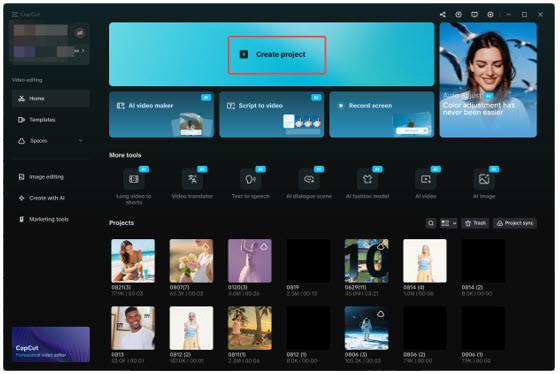
Install CapCut and log in. Click on the button Create project to create a workspace to store your blog images.
2. Create an AI image
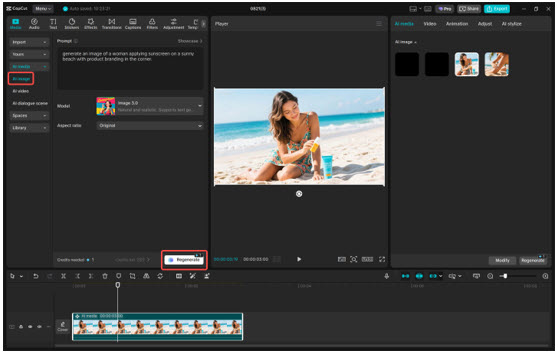
Navigate to "Media" > "AI image", write the text box a description of the kind of image you would like to create in your blog. You can also upload a reference image to have more accurate results. Select a generation model (say, Nano Banana Pro, Seedream 4.0, or Flux 1.1 Pro) and an aspect ratio, like 16:9. Click on the Regenerate button and have 3-4 image variants.
3. Export and use the image
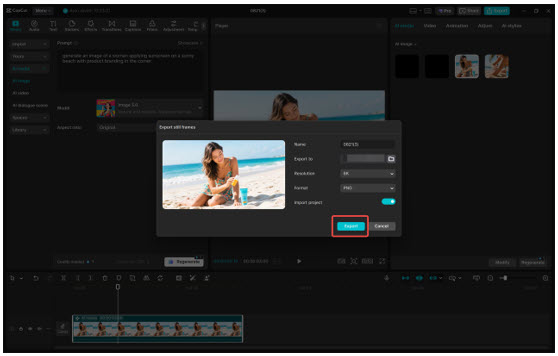
Click the three horizontal lines above the preview panel, click on the "Export still frames," give it a project name, select the resolution (4K or 8K) and click on the Export button. Your image can now be used in your blog, in social media or in your promotional campaigns.
Text to image generator: Generates images very fast based on text queries, which are useful in blog post illustrations and featured image generation.
Several visual styles: Select one of the realistic, artistic, modern, or abstract styles to suit your blog theme and tone.
High-resolution output: Export images in high quality that can be used in the web, social media and also in digital publications without compromising quality.
Speed of generation: Generation can be done in seconds and generates multiple variations of images, which can be used in the efficient generation of content.
Image support in reference images: Add some of your previously existing graphics or screenshots to help the AI generate images that are very similar to your preferred aesthetic.
CapCut integration: Add fonts, colors, and effects to generated visuals in CapCut to produce blog-worthy photos.
CapCut AI Image Generator is one of the tools available to bloggers who want to attract more people and enhance the aesthetic appeal of their posts. Due to the creation of high-quality images based on a set of simple textual prompts, bloggers will be able to create custom images that will not only improve the level of readability but also draw more attention and promote social sharing. The possibility to experiment with different styles, resolutions, and reference pictures makes sure that the visuals are right on point with the blog branding and tone of the content.
Being high-resolution, the images can be published on the web and also used in social media marketing. Using AI Image Generator by CapCut as a part of their content generation system, bloggers will be able to spend less time on content generation, increase its quality, and preserve a professional and visually pleasing image.
